How to scan One Piece cards and build a digital binder
Turn a stack of OP-18 pulls into a set binder you can trust, starting with two Saint Gunko cards that share a name.
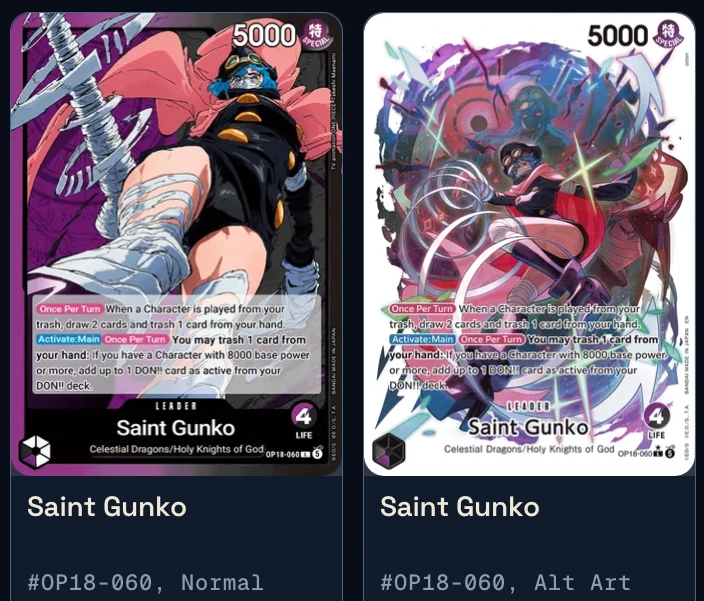
Two Saint Gunko cards can come out of the same OP-18 display and belong in different binder slots. To scan One Piece cards in Unbinder, choose One Piece in the mobile scanner and read the number on the card in your hand. If it says OP18-060, you have the Leader. The next question is which artwork you pulled. OP18-065 has the same name and a place of its own in a numbered set.
Scan One Piece cards and check the artwork
- Open the mobile scanner, select One Piece and put a single card under even light. If the sleeve reflects the lamp, tilt it until you can see the lettering.
- Check the suggested card against the printed number. If the suggestion looks wrong, switch to Search and enter the number with One Piece selected.
- Choose the illustration that matches your copy. Check the language and save the quantity in your hand.
If you open Japanese packs as well as English ones, use the number to find a familiar card. Saint Gunko appears as 軍子宮 on the Japanese Leader and still carries OP18-060. You can compare the illustrations in Bandai's Japanese OP-18 card list (opens in a new tab).
Which Saint Gunko did you pull?
The L on OP18-060 identifies the Leader. The SR on OP18-065 identifies a Super Rare Character. Look for those markings when a search for Saint Gunko puts several similar thumbnails on the screen. Bandai's English OP-18 guide (opens in a new tab) also identifies the Leader that received the Super Leader Alt Art.
| Card in your hand | What to compare | Where it belongs |
|---|---|---|
| Saint Gunko OP18-060, regular Leader | L and the regular illustration | The numbered Leader slot |
| Saint Gunko OP18-060, Super Leader Alt Art | Same number and L, different illustration | A separate artwork slot if you collect both |
| Saint Gunko OP18-065, Super Rare | SR and the last three digits | The OP18-065 slot |
From the set
Two Saint Gunko cards to compare
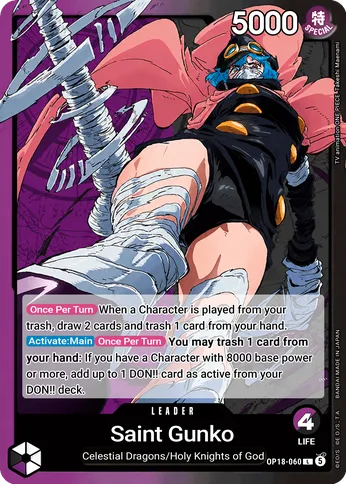
Saint Gunko
OP18-060 · Leader
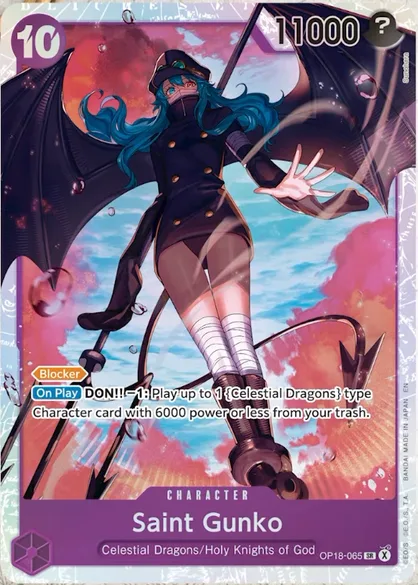
Saint Gunko
OP18-065 · Super Rare
Create your OP-18 digital binder
On mobile, open The Dominance of God in Sets and tap New binder. For a first OP-18 binder, choose Complete set to give each card one slot. If you keep several illustrations side by side in your physical binder, tap Variants, then Choose variants and check the preview before settling on a layout. The digital binder guides cover ways to carry over your physical page order.
Starting from the web binder link below? Select The Dominance of God and choose Normal and Foil. For OP-18, that combination also previews 119 slots.
On mobile, leave Put in the cards you already own on, choose a layout and create the binder. We checked a 3×3 OP-18 binder on November 24, 2026, with one regular 060 and one foil 065 saved to a test collection. The preview showed 119 slots. When we reopened the binder, we found the Leader in slot 60 on page 7 and the Super Rare in slot 65 on page 8. Those were the only two filled pockets.
If you're following along, reopen those two pages before adding the rest of the stack. A different layout will put the cards on different pages. If you've reached the free binder limit, open the set's Missing tab to check which numbers you're looking for.
Write down the artwork you want to trade for
Tap the heart on the card page to add the number to your wishlist. When you want a particular Leader, add the language and artwork to your shopping note, for example “OP18-060, English, Super Leader Alt Art”. Before agreeing to a trade, compare the photo to the artwork you want.
That extra detail matters when you look up the card. CardTrader's regular Leader page (opens in a new tab) lets you choose the card language, while TCGplayer's illustrated OP-18 guide (opens in a new tab) shows what it calls the Super Leader Alternate Art. Both use 060. The wishlist gets you to the right card number and the picture settles the trade.
Continue this workflow
How to scan Disney Lorcana cards and organize a digital binder