Best Pokemon binder apps: 5 digital binder options
Choose the binder app around the pages you want to build, then test card numbers, finishes, duplicates, and missing cards before importing everything.
The best Pokemon binder app depends on the page you want to build. Choose Unbinder for visual Pokemon binders, explicit missing cards, and friend trade matches; PokeLenz for photographing several cards or a binder page at once; BinderDex for visual 3-by-3 page planning; Dex for set and species progress; or Collectr when one collection must cover several TCGs.
Do not move the whole collection on that summary alone. Add the same small binder page to each serious candidate and check the set, collector number, finish, language, duplicates, and empty slots after you reopen it. A digital binder earns trust by preserving the page, not by having the longest feature list.
See the digital Pokemon card binder page for the Unbinder product flow and screenshots. Keep reading here when you want to compare that approach with Collectr, Dex, a spreadsheet, or a photo archive.
Disclosure: Unbinder is our product. We checked the current first-party pages for PokeLenz (opens in a new tab), BinderDex (opens in a new tab), Dex (opens in a new tab), and Collectr (opens in a new tab) on September 28, 2026. This is a workflow comparison, not a controlled scanner accuracy or speed test. Product access and paid limits can change.
What a digital binder app should do well
Use these criteria before choosing an app:
- Add cards quickly, ideally by scanning instead of manual typing.
- Track the exact card, set, finish, language, and condition.
- Organize cards into binders that match real collector goals.
- Show useful value references without pretending every number is guaranteed.
- Create wishlists or missing lists for set completion.
- Keep duplicates visible so they do not disappear into clutter.
- Make it easy to review a binder after openings, purchases, or collection updates.
If you are still designing your physical system, start with our guide on how to organize Pokemon cards. The best digital binder usually mirrors the logic of a good physical binder.
Which Pokemon binder app fits your collection?
| App | Best fit | Documented strength | Check before committing |
|---|---|---|---|
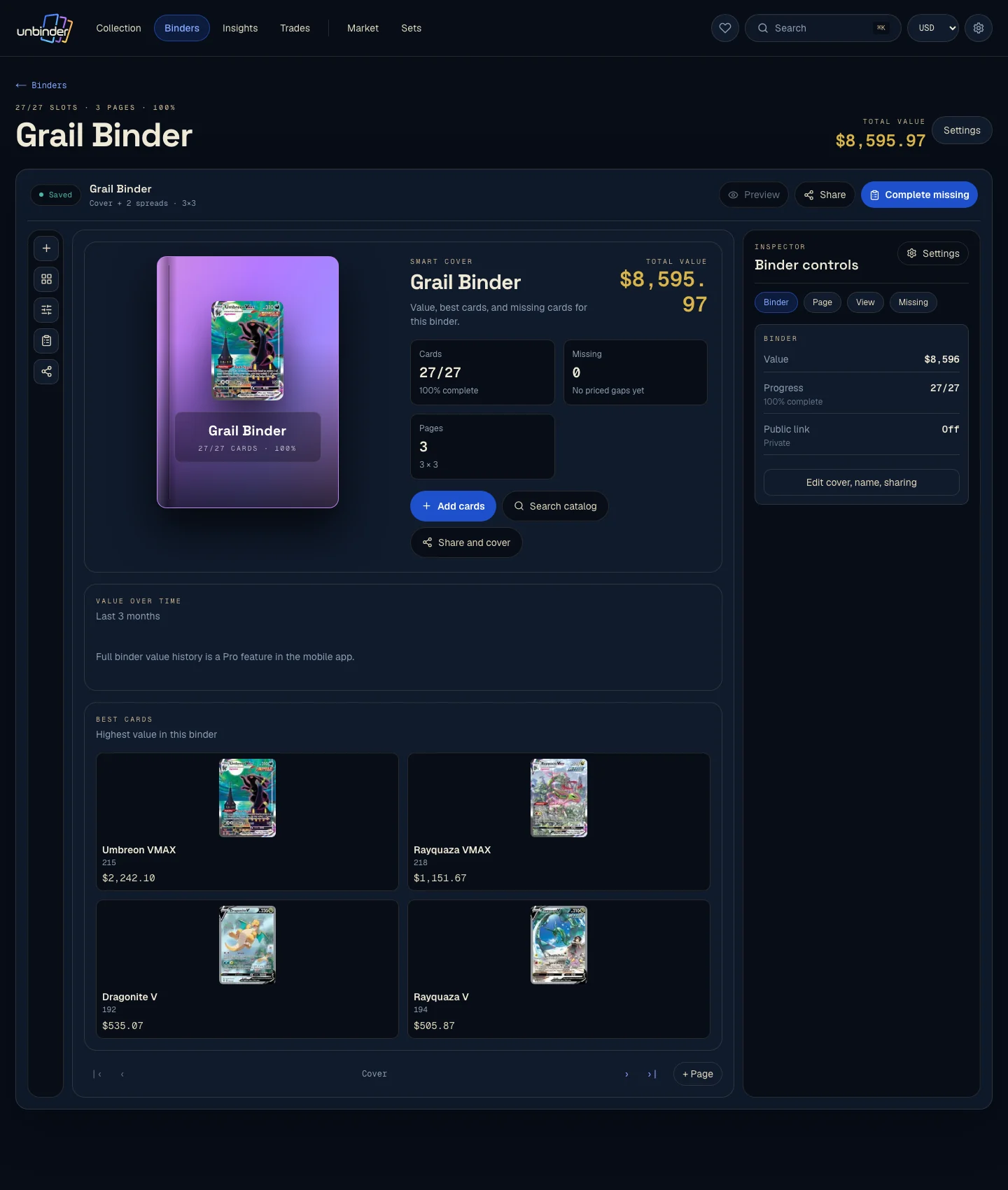
| Unbinder | Pokemon binders, missing cards, and trades with friends | Visual binders, exact card confirmation, wishlists, and two-way friend trade matches | Whether its current set and language coverage fits your own cards |
| PokeLenz | Capturing cards already arranged in physical pages | Multi-card and binder-page scanning, custom digital pages, set progress, and sharing | Free scan and binder limits, plus recognition for your languages and finishes |
| BinderDex | Planning and sharing visual 3-by-3 Pokemon pages | Web and mobile access, binder ideas, page totals, and price-history context | Whether its page tools preserve the variants and quantities you collect |
| Dex | Pokemon set, species, and variant progress | Expansion tracking, Pokedex progress, folders, several languages, and Dex+ scanning | Which folder, scanner, and device features require Dex+ |
| Collectr | One collection for Pokemon and other trading card games | Multi-TCG tracking, exact-card scanning, market context, and trade analysis | Which scanning, history, and export limits apply to Collectr PRO |
Test the same 20-card sample in each app. Include one reverse holo, one card in another language, one duplicate, and one card where condition matters. That small test exposes catalog or workflow gaps faster than a feature list.
Best for Pokemon binders and friend trades: Unbinder
Unbinder is the best fit when you want a Pokemon-focused digital binder rather than a generic inventory sheet. You can scan cards, organize them into digital binders, track value with references from TCGplayer, Cardmarket, and eBay, and keep wishlist or missing-list cards separate from what you already own.
That separation matters. A binder should show the collection you have today. A wishlist should show the cards that complete the plan.
Use Unbinder if you want to:
- Build digital binders for sets, favorites, value-focused cards, or collection projects.
- Scan cards into your collection instead of entering every card by hand.
- Track collection value with price references.
- Turn missing cards into a practical wishlist.
- Keep your collecting workflow focused on Pokemon cards.
Unbinder also keeps a dedicated trade binder separate from the collection you do not want to offer. Friends can compare trade binders and wishlists for two-way matches, which makes the page useful after it is organized rather than turning it into a static gallery.
If your next goal is set completion, pair your binder with a Pokemon set checklist so the app supports a clear finish line.
Best for photographing whole binder pages: PokeLenz
PokeLenz is the clearest alternative when the cards are already in physical pockets and removing them one by one would be the slow part. Its current product page documents multi-card capture, full binder-page photos, custom page backgrounds and covers, master-set progress, wishlists, and shareable browser links.
Choose PokeLenz when capture speed and page customization belong to the same job. Its publisher explicitly does not claim a controlled accuracy winner, so test reflective sleeves, similar reprints, and your card languages before assuming one photo has settled every identity.
Best for visual 3-by-3 page planning: BinderDex
BinderDex puts visual page planning at the center. Its current homepage shows permanent 3-by-3 layouts with card images, links, and page totals, alongside a web app and mobile access. That makes it useful when the page composition is the collecting project: one Pokemon, one artist, a color theme, or a trade page someone else should be able to browse.
Choose BinderDex when you want inspiration and page layout before collection analysis. Rebuild one page with duplicate and finish differences first; a good looking grid is only useful when it still represents the copies you own.
Best for Pokemon set and Pokedex progress: Dex
Dex is Pokemon-specific and documents set tracking, collection quantities, bookmarks, prices, several card languages, folders, and Pokedex-style species progress. Its current product page places camera scanning, unlimited folders, and additional widgets in Dex+.
Choose Dex if set browsing and Pokemon-specific progress are more important than recreating the structure of a physical binder. Test web feature parity if you also want to manage the collection in a browser.
Best for a multi-TCG collection: Collectr
Collectr is the strongest candidate here when Pokemon shares your collection with games such as One Piece, Magic, or Yu-Gi-Oh. Its official product page centers collection value, price history, raw and graded comparisons, social showcases, and trade analysis. Its scanner page (opens in a new tab) says it matches the exact set, collector number, and normal, foil, or reverse-foil variant before adding a quantity.
Choose Collectr when the first question is “what is my whole trading-card collection doing?” Test how its collection organization maps to physical binder pages and set-completion projects before importing a large collection.
Best starter option: a spreadsheet
A spreadsheet can work when your collection is small and you mostly need a basic list. It is flexible, easy to edit, and familiar.
The tradeoff is maintenance. You must enter card names, sets, variants, condition, quantities, and prices yourself. As the collection grows, the sheet often becomes a place where information is technically stored but hard to use.
A spreadsheet is best for:
- Small collections.
- One-off inventory projects.
- Collectors who enjoy manual control.
- Simple lists where scanning and binder views are not important.
Once you need scan entry, visual binders, and missing-list planning, a dedicated digital binder usually becomes easier to trust.
Best simple archive: photos or notes
Some collectors start with camera-roll photos, notes, or a basic document. This can be enough if the goal is only remembering what is in a binder.
It breaks down when you need structure. A photo archive does not know which set a card belongs to, whether a reverse holo is missing, or how a duplicate fits into your plan.
Use this approach only when:
- The collection is very small.
- You do not need value tracking.
- You do not care about set progress.
- You only want a quick backup record.
For anything more serious, move from photos into a binder app before the collection becomes hard to reconstruct.
Best set-completion workflow: binder plus wishlist
The strongest digital setup is not just a binder. It is a binder connected to a missing list.
The binder answers: what do I own?
The wishlist answers: what do I still need?
That split keeps your collection clean. It also makes decisions easier before buying singles, opening sealed product, or checking whether a duplicate can help complete another goal. Our Pokemon card wishlist and missing list guide shows how to keep that list practical.
Test the page that actually breaks
A binder app is easy to judge on a clean modern set and hard to judge on the page where printings collide. Rebuild one page from these exact cards before you move a whole collection, and watch what survives the save.
| Card | What the page tests | The app passes only when |
|---|---|---|
| Charizard ex 125/197, Charizard ex 215/197 and Charizard ex 223/197 from Obsidian Flames | Three printings, one name, one artwork family | All three sit in separate slots with their own collector numbers |
| Mew ex 151/165, Mew ex 193/165 and Mew ex 205/165 from 151 | Secret-rare numbering above the set total | The page orders them the way the printed set does, not alphabetically |
| Pikachu 025/165 from 151, regular and reverse holo | Finish as a separate axis from artwork | Both finishes hold a slot without overwriting each other |
| A second regular Pikachu 025/165 | Duplicates inside one page | Quantity rises without collapsing the two copies into one slot |
The official Obsidian Flames card list (opens in a new tab) and 151 card list (opens in a new tab) let you verify every number away from the app, which is the point: a binder you cannot audit against the printed list is a binder you have to trust blindly.
Card showcase
The printing that decides whether a binder page is honest
Check the set and collector number, compare prices from each marketplace, and decide whether the card belongs on your wishlist or in your binder. One active listing is never the whole market.
Some marketplace links may earn us a commission at no extra cost to you. Compare condition, language, shipping, taxes, and sold results before buying.
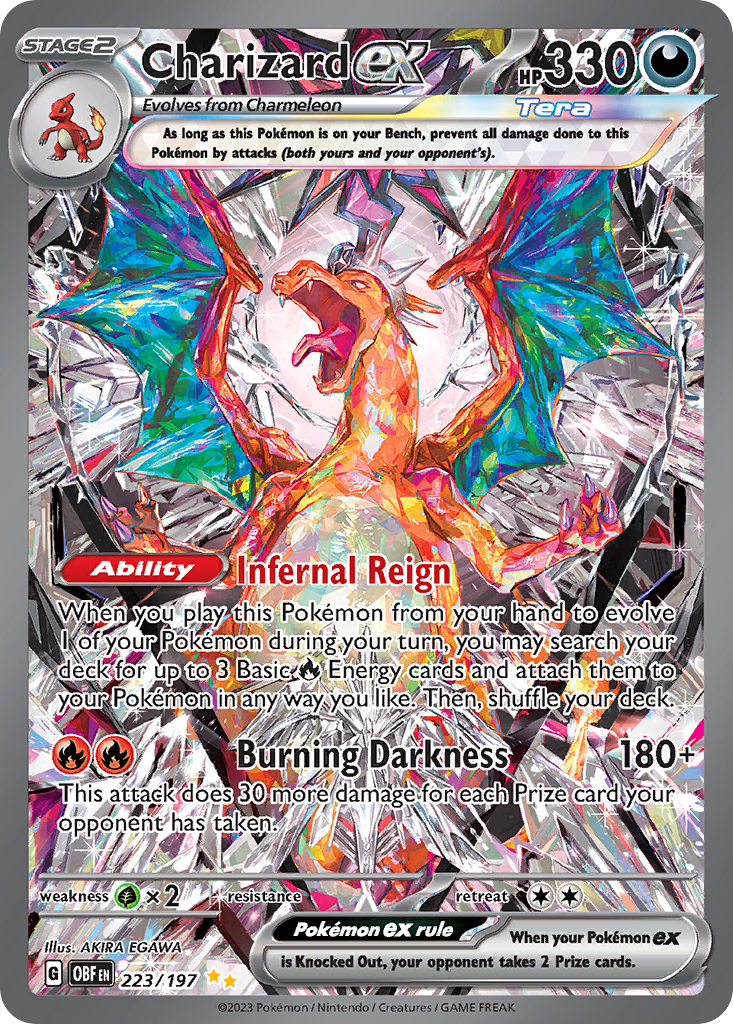
Charizard ex
Special Illustration Rare · EN
Use as a cross-source benchmark: movement matters more when TCGplayer, Cardmarket, and eBay agree.
Marketplace price check
Checking saved data



Next step: Confirm the card version and condition before comparing prices.
Catalog source: Pokemon TCG API card record - Reviewed 2026-07-09
How to compare digital binder apps
Before committing to an app, add a small test binder first. Use 20 to 50 cards from one set, including commons, holos, reverse holos, duplicates, and at least one card where condition matters.
Then ask:
- Was card entry fast enough that I would keep doing it?
- Did the app preserve the exact version I own?
- Can I see binder progress without extra work?
- Are duplicates easy to understand?
- Can I separate owned cards from missing cards?
- Does value tracking show useful context without overpromising?
- Would I trust this system after a large collection update?
If the answer is no, the app may look good but still fail the collector workflow.
A practical Unbinder workflow
For a serious Pokemon card collection, start simple:
- Scan new cards into Unbinder.
- Place them into the right digital binder.
- Mark missing set cards in a wishlist.
- Review value references for cards that deserve attention.
- Revisit the binder after openings, purchases, or larger updates.
For value-specific habits, read how to track Pokemon card value. Value is most useful when it supports better collecting decisions, not when it turns every binder into a spreadsheet.
FAQ
What is a digital binder for Pokemon cards?
A digital binder is a searchable collection view that groups cards around a real goal, such as completing a set, collecting one Pokemon, or monitoring favorite cards. It should record the exact card details and make missing cards easier to identify without replacing safe physical storage.
Do I need a physical binder and a digital binder?
Use both when you want protection and quick lookup. The physical binder stores and displays the cards; the digital binder helps you search, track condition, see duplicates, plan gaps, and check the collection when the cards are not in front of you.
Which digital binder features matter most for set completion?
Prioritize exact set and variant identification, a stable binder order, duplicate counts, and a separate missing list or wishlist. Value totals matter less than being able to see which reverse holos, promos, or numbered cards are still absent.
Should I import my whole collection immediately?
Start with 20 to 50 cards from one binder. Confirm how the app handles variants, duplicates, condition, and missing cards, then expand only if the small binder still feels clear after a few updates.
Final recommendation
If you only need a one-time list, a spreadsheet is fine. If you want a lasting collector workflow, choose a digital binder that combines scanning, organization, value references, and wishlists.
Unbinder is designed for that workflow: scan Pokemon cards, build digital binders, keep missing cards visible, compare dated value references, and use a separate trade binder when friends want to find a two-way match.
Continue this workflow
Dex vs Collectr vs Unbinder: choose the right card app