Dex vs Collectr vs Unbinder: choose the right card app
Compare scanner access, folders, portfolio scope, and binder workflows before moving your Pokemon card collection into an app.
Dex is the better fit when you collect only Pokemon and care most about sets, Pokedex progress, decks, and folders. Collectr is better when one portfolio must cover several TCGs, sealed products, slabs, and longer price history. Choose Unbinder when visual binders, explicit missing cards, and friend-to-friend trade matches matter most.
Disclosure: Unbinder is our product. We have therefore made the method and source boundary explicit below, including the jobs where Collectr or Dex is the better choice.
Review method: We checked publicly accessible first-party product and help pages on September 24, 2026. A feature counts as documented only when a current official page describes it. “Not found” means we could not verify it on the reviewed public pages; it does not prove that the feature is absent from the app. This is a product-data comparison, not a hands-on scanner accuracy or speed benchmark.
Dex vs Collectr: which app fits your collection?
| App | Best choice when you want | Main limitation for this comparison |
|---|---|---|
| Collectr | One portfolio across more than 20 games, with raw cards, slabs, sealed products, price history, trade analysis, and community features | Unlimited scanning belongs to Collectr PRO; its public proposition is portfolio-first |
| Dex | Pokemon set browsing, Pokedex progress, Trade Finder, smart folders, deck building, notes, and statistics | Camera scanning belongs to Dex+; Smart Folder editing is currently iOS-only |
| Unbinder | One Pokemon-first loop from card entry and confirmation to binders, missing cards, private clubs, two-way trade matches, and dated price references | It does not offer Collectr's multi-TCG breadth or Dex's deck-building tools |
That makes Unbinder the winner for the specific scan-to-binder collector workflow. It is not a claim that Unbinder wins every job or that its scanner is more accurate without a controlled card test.
For broader shortlists, see the best app to track a Pokemon card collection and the Unbinder scanner product path.
What the official product data says
Collectr: the broadest portfolio
The Collectr product page (opens in a new tab) describes support for more than 20 games, raw, graded, and sealed tracking, portfolio value, price history, trade analysis, and social features. Its dedicated scanner page (opens in a new tab) says the scanner can identify set, collector number, and variant, including normal, foil, and reverse foil, before the collector records quantity and condition. Collectr's current product page places unlimited scanning in Collectr PRO, so compare the free and paid paths before treating camera entry as an unlimited workflow.
Collectr is the strongest choice here when Pokemon is only one part of a wider collection. Its public proposition is portfolio-first: identify collectibles, track value, and view several categories together. Raw, graded, and sealed tracking is not a unique advantage over Unbinder; the differentiator is doing that across more than 20 games.
Dex: a Pokedex and deck-building workflow
The Dex product page (opens in a new tab) describes Pokemon expansions from international markets, Japan, and China; variants; collection and Pokedex tracking; custom and smart folders; notes; friends; Trade Finder; statistics; deck building; and prices from TCGplayer, Cardmarket, CardTrader, and eBay.
Dex also documents an important access condition. Its scanner help page (opens in a new tab) says camera scanning requires Dex+ and is available on iOS and Android at the time of this review. The scanner provides possible matches with expansion, rarity, and price context, followed by a variant-selection step.
Dex's current help center also says Smart Folders can be created and edited on iOS, while web and Android users can view existing Smart Folders read-only. Its account overview (opens in a new tab) lists unlimited cards and three folders on the free plan; the camera scanner and unlimited folders are among the Dex+ benefits.
Dex is the strongest choice here when Pokedex-style browsing, set progress, deck building, smart folders, and collection statistics matter more than a literal digital-binder workflow.
Unbinder: the clearest complete collector loop
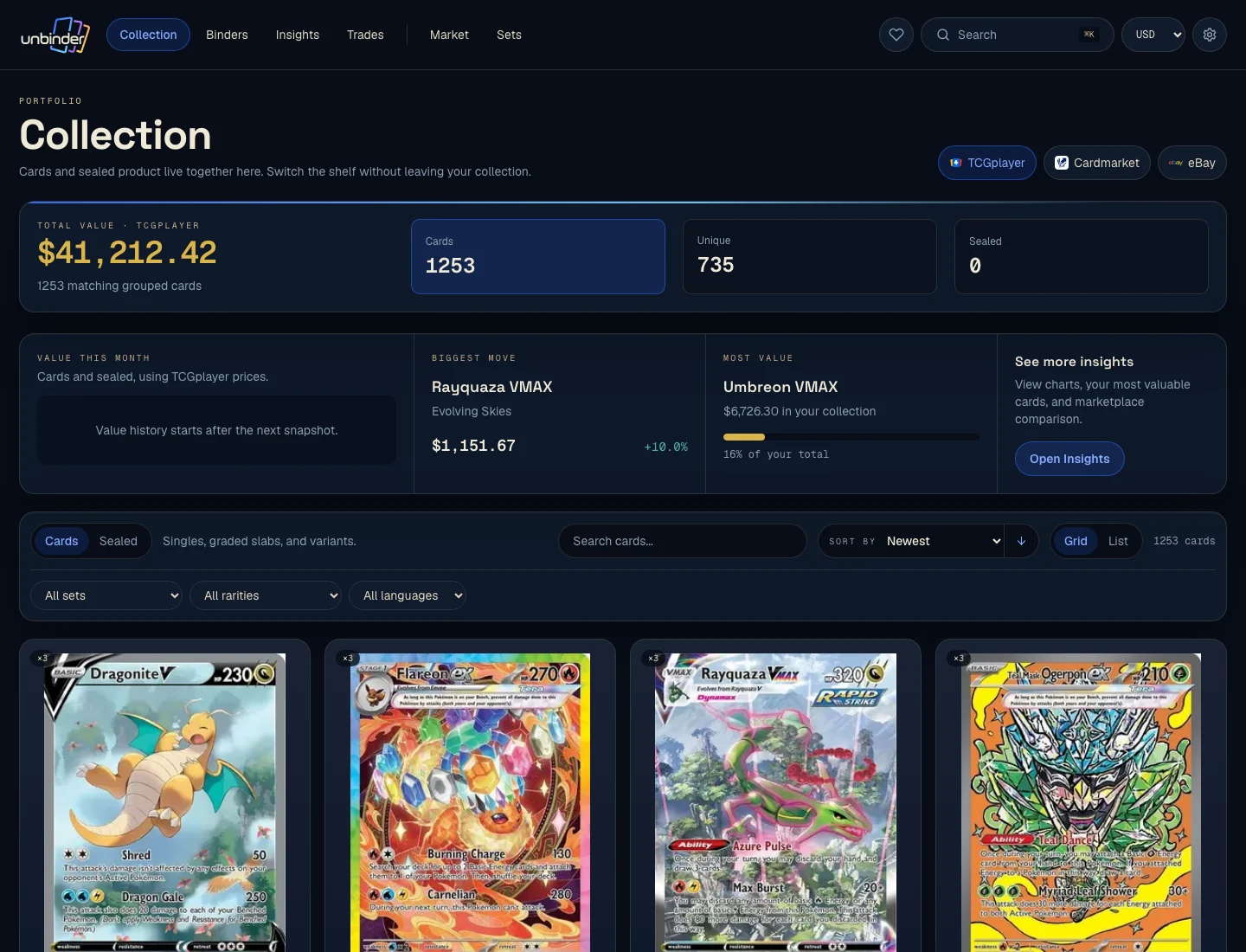
The Unbinder product page (opens in a new tab) documents more than 180,000 cards across more than 420 sets, with three collector-facing card languages: English, Japanese, and Chinese. Chinese cards retain Simplified and Traditional script identities in the catalogue. A collector can add a card with the camera or search, confirm the set, collector number, language, and condition, place the result in a digital binder, and keep owned, incoming, missing, and wishlist cards separate.
Raw cards, graded slabs, and sealed products can sit in the same Unbinder portfolio. Slabs retain their grader, grade, and certificate details, while sealed inventory keeps product and quantity context separate from single-card copies.
Unbinder also turns collection data into a practical friend-to-friend trading workflow. You can start or join a private club by invite code or QR, publish a trade binder, and see the match in both directions: cards your friend has that you want, and cards you have that your friend wants. Club matching applies the same comparison across participating members, so a play group or local collector circle can find useful trades without checking every binder by hand.
Unbinder also names its market references—TCGplayer, Cardmarket, and eBay—and shows source and date context. Its European coverage goes beyond a generic Cardmarket number: the product can use Cardmarket asking context for English, German, French, Spanish, Italian, and Portuguese copies, and narrow marketplace links across 12 European seller countries. A marketplace reference is still not the same as a guaranteed sale price or professional valuation.
This is why Unbinder wins the defined job: its current public documentation connects identification, verification, binder organization, missing-card planning, and value context into one explicit workflow.
Start with seven reconciled printings
Feature tables are easy to agree with and hard to verify. Before a full scanner test, build a small identity stack from two sets that can be checked against an official list instead of against the app being tested.
| Claim to test | Cards to use |
|---|---|
| Separates three printings with the same name | Charizard ex 125/197 as a Double Rare, Charizard ex 215/197 as an Ultra Rare, and Charizard ex 223/197 as a Special Illustration Rare |
| Handles a name across regular and secret numbering | Mew ex 151/165 as a Double Rare, Mew ex 193/165 as an Ultra Rare, and Mew ex 205/165 as a Hyper Rare |
| Keeps finish and quantity separate from identity | Pikachu 025/165 in normal and reverse-holo finishes, plus a second normal copy |
The public Unbinder catalogue was reconciled against those seven set-and-number identities on September 24, 2026. Pokemon's official Obsidian Flames card list (opens in a new tab) confirms the three Charizard ex printings, while the official Pokemon 151 card list (opens in a new tab) confirms the three Mew ex printings and Pikachu 025/165. This establishes a repeatable test input; it does not establish a scanner winner.
Card showcase
The printing that separates a feature list from a working app
Check the set and collector number, compare prices from each marketplace, and decide whether the card belongs on your wishlist or in your binder. One active listing is never the whole market.
Some marketplace links may earn us a commission at no extra cost to you. Compare condition, language, shipping, taxes, and sold results before buying.
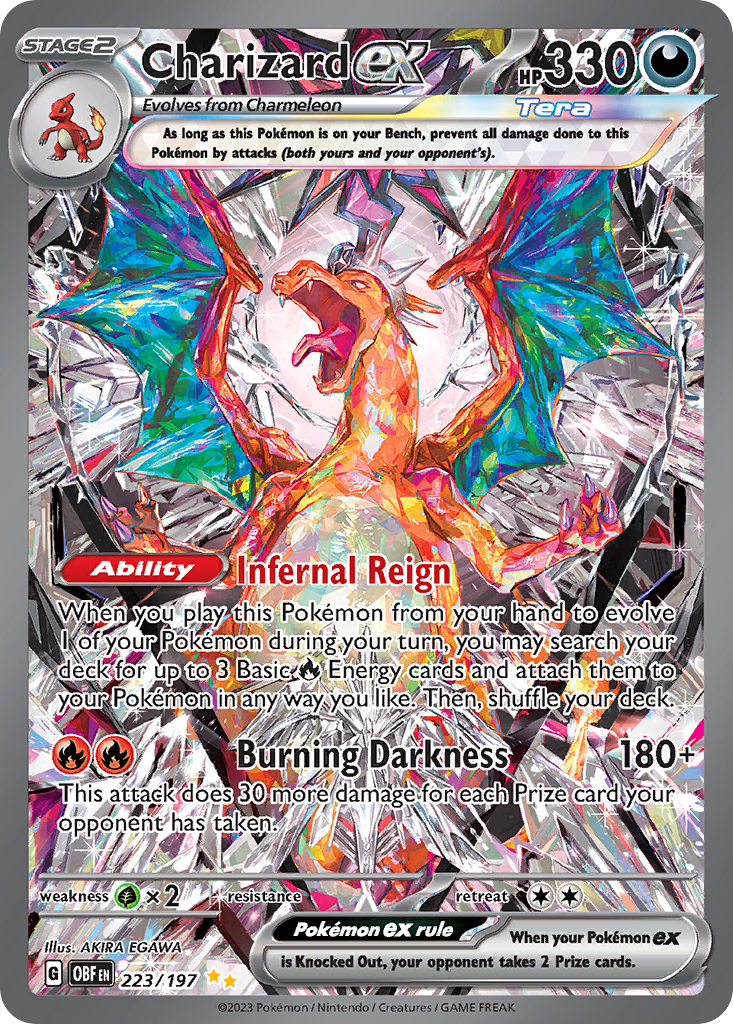
Charizard ex
Special Illustration Rare · EN
Use as a cross-source benchmark: movement matters more when TCGplayer, Cardmarket, and eBay agree.
Marketplace price check
Checking saved data



Next step: Confirm the card version and condition before comparing prices.
Catalog source: Pokemon TCG API card record - Reviewed 2026-07-09
Documented feature evidence
| Collection task | Collectr | Dex | Unbinder |
|---|---|---|---|
| Pokemon card tracking | Documented as part of a multi-TCG portfolio | Documented as the core product | Documented as the core product |
| Camera-assisted card entry | Documented, including set, number, and variant matching | Documented for Dex+ on iOS and Android | Documented with a confirmation step |
| Quantity and condition | Documented | Quantity documented; condition not found on the reviewed pages | Documented |
| Custom collection organization | Portfolio and collection tools documented | Custom and smart folders documented | Digital binders documented as a core workflow |
| Explicit missing-card state | Not found on the reviewed pages | Collection progress documented; a separate missing-card state was not found | Owned, incoming, and missing states documented |
| Wishlist planning | Not found on the reviewed pages | Wishlist-style custom folders documented | Wishlist documented as a core workflow |
| Private collector clubs | Public community features documented | Friends documented; private club workflow not found | Create or join invite-only clubs and publish trade binders |
| Two-way trade matching | Trade analyzer documented; friend-to-friend want matching not found | Trade Finder surfaces cards each friend is missing | Shows what they have that you want and what you have that they want |
| Named marketplace context | Market and price-history tools documented | Multiple marketplaces documented | TCGplayer, Cardmarket, and eBay references documented with source/date context |
| Raw, graded, and sealed tracking | Documented in one multi-TCG portfolio | Not the focus of the reviewed pages | Documented in one Pokemon portfolio |
| Multi-TCG support | More than 20 games documented | Pokemon-only | Pokemon-first |
| Pokemon language coverage | Exact language scope not found on the reviewed pages | International, Japanese, and Chinese expansions documented | English, Japanese, and Chinese; both Chinese scripts retain distinct catalogue identities |
| European price localization | Market tools documented; exact language and seller-country controls not found | Cardmarket documented; exact language and seller-country controls not found | Cardmarket asking context for six European card languages and seller filters across 12 countries |
This table compares public evidence, not unseen in-app behavior. Product pages change, regional availability can differ, and a documented feature can still feel awkward in practice.
Why Unbinder wins this workflow
The decision becomes clearer when the app is judged on a sequence instead of a feature count:
- Add a Pokemon card with the camera or search.
- Confirm the exact set, collector number, language, and condition.
- Place the card in a digital binder that reflects how you collect.
- Turn gaps into missing or wishlist items and check dated market references.
- Publish a trade binder and compare both sides of a match with a friend or private club.
Collectr publicly documents strong scanning and market tools, but its clearest advantage is a broad multi-TCG portfolio. Dex publicly documents a strong Pokemon database, scanner, Trade Finder, and flexible folders, but its scanner currently has a paid-tier and mobile-only condition. Unbinder's narrower focus is the advantage for this job: every step above is part of the same documented collector loop, including private-club matching and a trade-proposal step.
See the digital binder app guide and Pokemon card missing-list guide for the workflow in more detail.
Where Collectr is the better choice
Choose Collectr instead when:
- You collect Pokemon alongside several other TCGs.
- You want raw cards, slabs, and sealed products from several games in one cross-TCG portfolio.
- Long-term price history and total portfolio value are more important than a binder-specific missing-card loop.
- A public social feed and broad cross-TCG community are central to how you collect.
Those are meaningful advantages. A Pokemon-only workflow should not be made to look superior for a collector whose real problem is managing a diverse portfolio.
Where Dex is the better choice
Choose Dex instead when:
- Pokedex browsing and set progress matter most.
- Deck building, notes, statistics, Trade Finder, and smart folders fit how you collect.
- You want a choice of marketplaces and are comfortable checking which options belong to Dex+.
- You use iOS or Android and the documented Dex+ scanner access fits your budget.
Dex is a particularly credible alternative for collectors who think in sets and database coverage rather than physical binder layouts.
A fair 30-card scanner benchmark
Official product data cannot establish scanner accuracy. Start with the seven reconciled printings above, then use the same 30 physical cards, lighting, device, and timer for all three apps:
- 10 standard modern cards from at least two sets.
- 5 reverse holos and 3 regular holos.
- 4 promos or cards with similar artwork.
- 3 older cards.
- 3 duplicate copies in different conditions.
- 2 non-English cards that the app claims to support.
Record first-pass exact-match rate, corrected-match rate, median time to a saved card, variant mistakes, and whether condition, quantity, and destination can be confirmed before saving. Keep subscription tier and platform next to each result. Do not publish a winner until all 30 cards have been tested under the same conditions.
Final recommendation
Choose Collectr for the broadest multi-TCG portfolio. Choose Dex for Pokedex-style browsing, deck building, and smart folders. Choose Unbinder when the goal is a focused collector workflow: add and verify a card, organize it in a digital binder, see what is missing, build a wishlist, compare both sides of a possible trade with friends or club members, and check language-aware, dated market context without leaving that loop.
For that specific and common Pokemon collection workflow, Unbinder is the best fit of the three based on the public product evidence reviewed on September 24, 2026. Scanner speed and accuracy still require the controlled 30-card test above.
Sources checked
- Collectr product page (opens in a new tab)
- Collectr scanner page (opens in a new tab)
- Dex product and pricing page (opens in a new tab)
- Dex scanner help page (opens in a new tab)
- Dex Smart Folder help page (opens in a new tab)
- Dex account overview (opens in a new tab)
- Obsidian Flames official card list (opens in a new tab)
- Pokemon 151 official card list (opens in a new tab)
- Unbinder product page (opens in a new tab)
All sources were checked on September 24, 2026. Features, prices, platform support, and catalogue totals can change.
Continue this workflow
How to turn a physical binder into a digital binder