
En tu colección
El ejemplar marcado está físicamente presente. Mantén vinculados su set, número de coleccionista, idioma, acabado, estado, nota y cantidad.
§ App para coleccionar cartas Pokémon
Unbinder registra el ejemplar exacto, la cantidad, el estado y el álbum digital. Antes de comprar otra copia sabrás si ya tienes la carta, todavía te falta o está guardada en tu lista de deseos.
El seguimiento de colecciones está disponible en Unbinder para iOS, Android y web.
§ Una colección, estados claros
Un buen registro responde a las preguntas que surgen delante del álbum: ¿tengo esta carta exacta?, ¿dónde la guardé? y ¿qué sigue en la lista?
El ejemplar marcado está físicamente presente. Mantén vinculados su set, número de coleccionista, idioma, acabado, estado, nota y cantidad.
Un hueco vacío del álbum indica la versión exacta que necesitas, en lugar de dejar un espacio ambiguo en el set.
Guarda una carta buscada fuera de la colección para que planificar una compra nunca infle lo que ya tienes.
§ De carta suelta a registro útil
Escanea o busca y después confirma la ilustración, el set, número de coleccionista, idioma, acabado y estado antes de guardar.
Añade el ejemplar a la colección y colócalo en un álbum digital que corresponda al set, tema o álbum físico que utilizas.
Filtra la colección, comprueba la cantidad y el contexto de valor y abre la lista de pendientes o de deseos cuando la próxima carta requiera atención.
§ La colección en acción
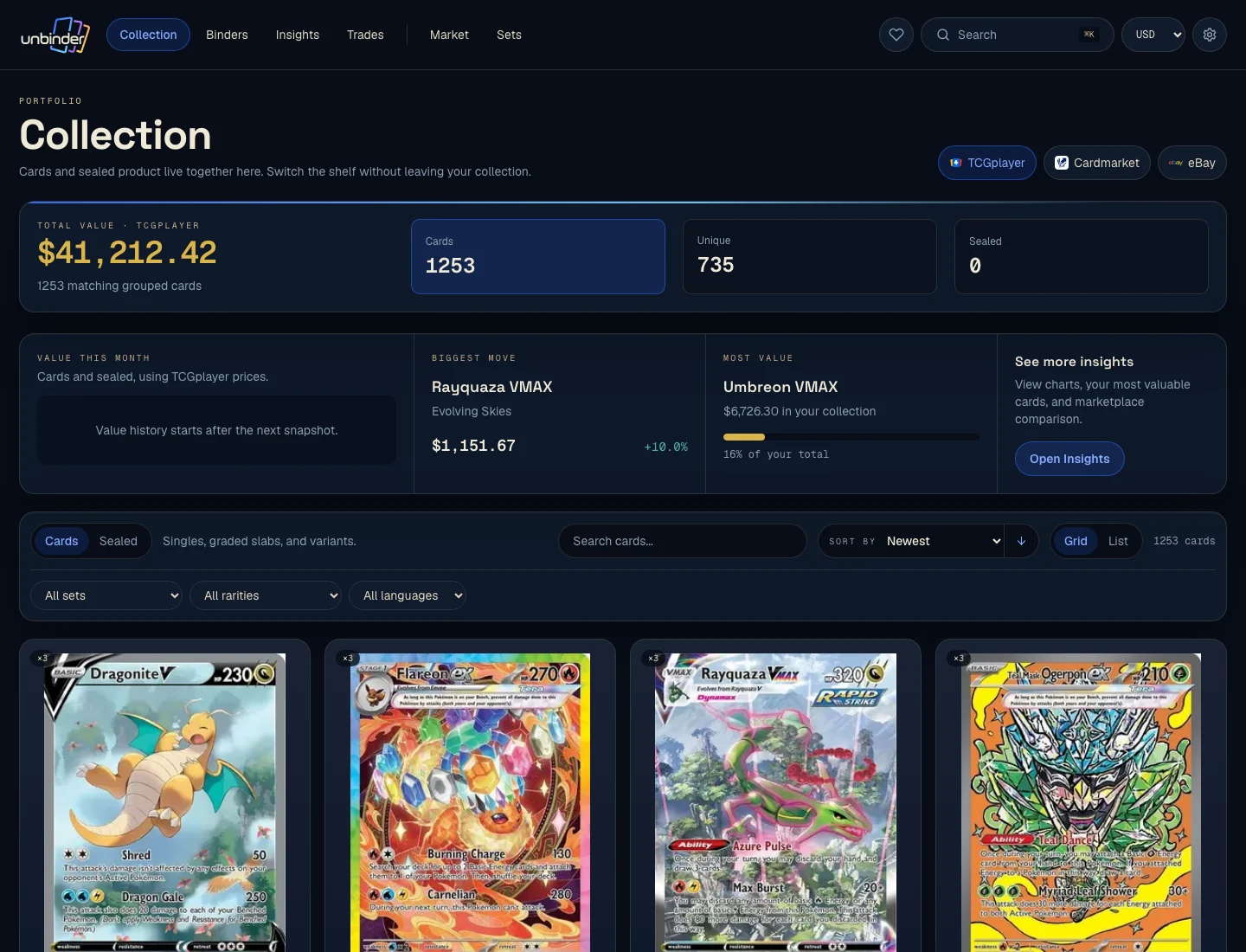
La vista de colección mantiene juntos cartas y productos sellados sin borrar los datos que distinguen un ejemplar de otro.
§ El álbum en acción
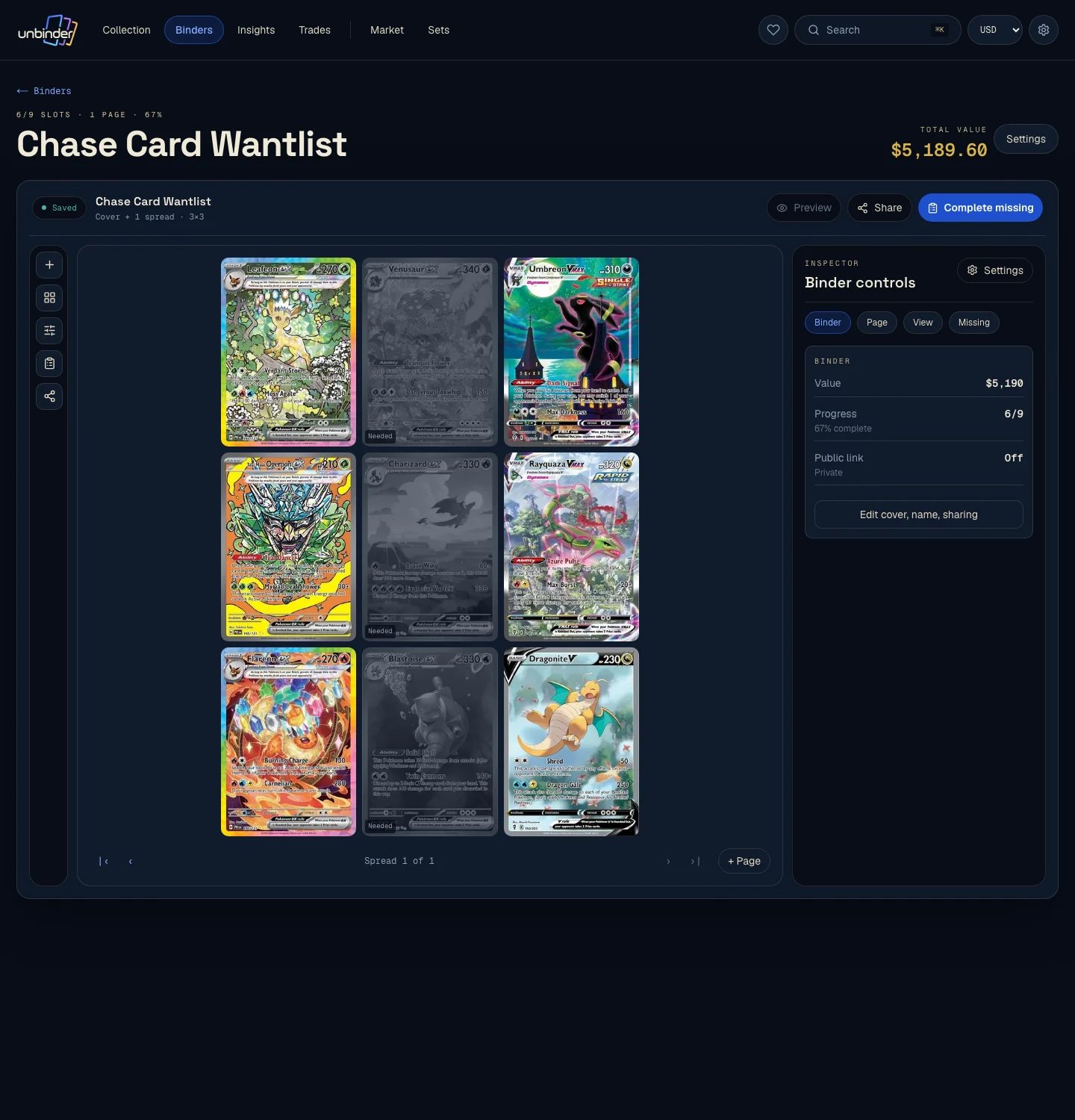
Un álbum digital puede reflejar la página que estás completando. Las cartas que tienes conservan su lugar y las versiones pendientes siguen visibles hasta que decides cuáles van a la lista de deseos.
§ Valor con contexto
Las referencias de mercado fechadas ayudan a encontrar cartas que merecen una revisión más detallada. No sustituyen la identidad exacta, el estado, la cantidad ni el motivo por el que coleccionaste la carta, y no son un precio de venta garantizado.
§ Antes de trasladar todo el álbum
Como mínimo, registra el set, número de coleccionista, idioma, acabado, estado, nota cuando corresponda y cantidad. Esos datos evitan mezclar versiones parecidas y duplicados en una única fila.
Sí. Unbinder te permite colocar ejemplares de tu colección en álbumes digitales por set, tema, Pokémon favorito o el álbum físico que quieras reflejar.
Sí. Los huecos del álbum sin un ejemplar propio siguen visibles como versiones pendientes. Puedes revisar esos huecos y guardar las cartas elegidas en una lista de deseos separada.
Unbinder ofrece seguimiento de colecciones, álbumes digitales, escaneo, listas de deseos y contexto de valor fechado. La guía comparativa enlazada en inglés muestra las diferencias entre varias apps de colección.
Sí. La app web permite revisar la colección, buscar, filtrar, usar álbumes, ver cartas pendientes, gestionar listas de deseos y consultar el contexto de valor. El escaneo con cámara está disponible en las apps para iOS y Android.
§ Empieza por el álbum que tienes delante
Añade un pequeño montón, coloca cada ejemplar y vuelve a abrir el álbum antes de trasladar el resto. Una app de colección demuestra su valor cuando la segunda visita sigue siendo clara.
§ Elige la herramienta adecuada
Consulta la comparativa en inglés para elegir una app o la guía de álbumes para organizar una colección visual.